Customer Wallet
A mobile-first wallet your customers carry in their pocket — built on the same double-entry ledger that runs the rest of the platform.
LedgerFlow ships a customer-facing wallet as an installable PWA (the HTMX UI, also wrapped
for the Play Store as a Trusted Web Activity) and as a mirrored set of SQLPage screens.
Both front-ends call one self-scoped access layer — api.me_* — so a customer sees and
moves only their own money, whichever channel they use.
Behind the simple Send · Request · Top up · Settle · Pay by QR buttons sits the full journal engine: every movement is a balanced double-entry transaction, every fee is its own auditable posting, and every read is constrained by row-level security keyed to the authenticated customer. This page explains the options, who they are for (P2P, B2B), how fees are applied, and the security model that makes it safe to run under the customer's own low-privilege role.
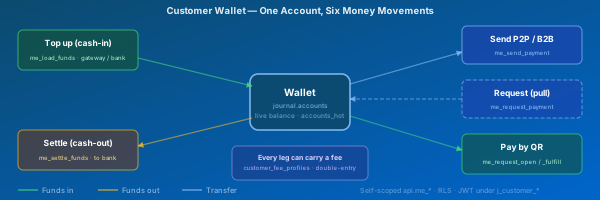
Two Front-Ends, One Access Layer
The wallet exposes six money movements around a single account balance. Each maps to
exactly one endpoint in the shared api.me_* layer:
| Action | Endpoint | Direction | Typical use |
|---|---|---|---|
| Send | api.me_send_payment |
out | P2P transfer or B2B pay-a-merchant |
| Request | api.me_request_payment |
pull | Ask another customer to pay you |
| Top up | api.me_load_funds |
in (cash-in) | Load the wallet from card / bank |
| Settle | api.me_settle_funds |
out (cash-out) | Withdraw to a bank account |
| Pay by QR | api.me_request_open / api.me_request_fulfill |
in | Show a code; anyone scans to pay you |
| Statement | api.me_statement |
read | Paginated history + proof-of-payment |
The HTMX PWA (docker_mounts/htmx-ui/) runs under the customer's own JWT and calls
PostgREST directly; the SQLPage customer pages set a session GUC and call the same
functions. Because both go through api.me_*, a change to an endpoint updates both UIs at
once — same enforcement, different transport. Real-time payment_received notifications are
pushed over WebSocket to the payee the moment a transfer posts.
Person-to-Person (P2P)
The everyday case: one customer pays another, or asks to be paid.
Send debits the payer's wallet and credits the payee's in a single balanced transaction, with a payer note, a recipient note, and a shared reference. The payee receives a live in-app notification and can email a proof-of-payment PDF straight from the statement line.
Request is the pull equivalent — you nominate another customer, an amount and a reference, and they are prompted to approve payment from one of their accounts. Nothing leaves anyone's balance until the payer acts.
Pay by QR removes the need to know the other party in advance. The payee generates an
open request (api.me_request_open) carrying a single-use bearer token with an expiry;
anyone who scans the QR fetches the details (api.me_request_fetch) and fulfils it from
their own account (api.me_request_fulfill). The token is locked on fulfilment, so a code
can never be paid twice, can't be self-paid, and stops working once it expires.
Business-to-Business / Merchant (B2B)
The same api.me_send_payment rail carries merchant payments — a customer paying a
shop, or one business settling with another. What differs is not the mechanism but the
fee profile attached to the paying account:
- A merchant-acquiring profile can charge the payer, the payee (merchant), or both, and can take the fee on top of the amount or out of it.
- Because every account is created from an account profile that points at a
customer_fee_profilesrow, the platform operator (PSP) prices P2P and merchant traffic independently without changing any code. - Merchant collections settle to a bank via Settle, and a merchant's static "Scan-to-Pay-Me" QR (configurable on the Home / Login screen) lets walk-up customers pay in person with no pre-registration.
The wallet is therefore a single product that serves consumer P2P, merchant acceptance, and business disbursement — the ledger treats them identically; the fee engine and KYC tier express the commercial difference.
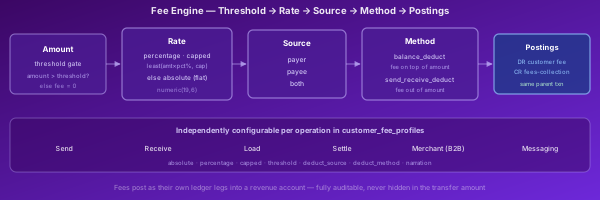
How Fees Are Applied
Fees are configuration, not code. Each account inherits a customer_fee_profiles
row (via its account profile), and that row carries an independent block of settings for
every operation — send, receive, load, settle, merchant, and the per-message fees (SMS /
WhatsApp / email). For each block the engine resolves the fee in four steps:
1 · Threshold gate — *_fee_threshold. If the transaction amount is at or below the
threshold, the fee is zero. This lets small-value transfers run free while larger ones
are priced.
2 · Rate — percentage first, then flat. If *_fee_percentage > 0, the fee is
least(amount × percentage%, *_fee_capped) — a percentage capped at a ceiling.
Otherwise the absolute flat fee *_fee_absolute applies. (The cap is ignored when the
percentage is zero.)
3 · Source — *_fee_deduct_source ∈ {payer, payee, both}. Decides which party bears
the fee. both charges each side its own fee leg.
4 · Method — *_fee_deduct_method:
balance_deduct— the fee is charged on top of the transfer; the payee receives the full amount and the fee comes additionally out of the payer's (and/or payee's) balance.send_receive_deduct— the fee is taken out of the transfer amount; the payee receives the amount less the fee.
Whatever the outcome, the fee is never hidden inside the transfer: it posts as its own
debit/credit pair into a fees-collection (revenue) account within the same parent
transaction. That is why a wallet statement can show a transfer line and its fee line
separately, and why api.me_statement deliberately pairs each posting with the opposing leg
of equal magnitude so fee lines and transfer lines attribute to the correct counterparty.
The Six Fee-Bearing Operations
Every operation has the same seven-field shape in customer_fee_profiles, so an
operator configures them consistently:
| Field | Meaning |
|---|---|
*_fee_absolute |
Flat fee, used when percentage is 0 |
*_fee_percentage |
Percentage of amount (e.g. 1.5 = 1.5%) |
*_fee_capped |
Ceiling on the percentage fee |
*_fee_threshold |
Minimum amount before any fee applies |
*_fee_deduct_source |
payer · payee · both |
*_fee_deduct_method |
balance_deduct · send_receive_deduct |
*_fee_narration |
Text that labels the fee posting |
Prefix * with send_payment, receive_payment, load_payment, or settle_payment.
Merchant pricing is expressed through the send/receive blocks on the merchant's account
profile. Messaging fees (request_payment_*, confirm_payment_*, request_balance_*) are
flat amounts that recover the cost of an SMS, WhatsApp, or email notification.
Worked Example — A Capped Percentage Send Fee
A profile prices outbound P2P sends like this:
send_payment_fee_threshold    = 10.00     -- free under 10
send_payment_fee_percentage   = 1.50      -- 1.5% above that
send_payment_fee_capped       = 5.00      -- never more than 5
send_payment_fee_absolute     = 0.50      -- (only if percentage were 0)
send_payment_fee_deduct_source = payer
send_payment_fee_deduct_method = balance_deduct
- Send 8.00 → amount ≤ threshold → fee 0.00; payee receives 8.00.
- Send 100.00 → 1.5% = 1.50 ≤ cap → fee 1.50; payer's balance −101.50, payee +100.00
(
balance_deduct). - Send 1,000.00 → 1.5% = 15.00 → capped to 5.00; payer −1,005.00, payee +1,000.00.
- Switch the method to
send_receive_deductand the last case becomes payer −1,000.00, payee +995.00 — the fee comes out of the amount instead.
Every one of those fee numbers is a real ledger posting into the revenue account — reconciled and audited like any other transaction.
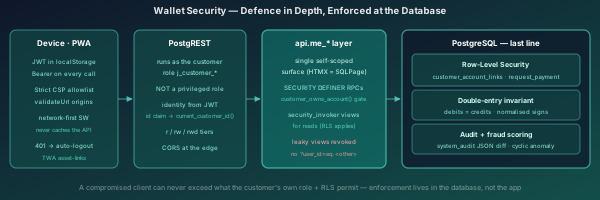
Security — Enforced at the Database, Not the App
The wallet runs under the customer's own low-privilege role (j_customer_*), not a
trusted service account. That is a deliberate choice: a stolen token or a tampered client can
never do more than the customer's own role plus row-level security permit. Defence is layered:
- Identity is server-derived.
api.current_customer_id()reads the user id from the signed JWT (PostgREST) or the session GUC (SQLPage). The client never asserts who it is in a parameter — it can't pass?user_id=eq.<someone-else>and be believed. - Row-Level Security on
journal.customer_account_linksandjournal.customer_request_paymentscopes every read to the authenticated customer. The read views aresecurity_invoker, so RLS actually applies to the calling role. SECURITY DEFINERwrite RPCs with an ownership gate. Every money movement callsapi.customer_owns_account()before acting, then delegates to the privileged base functions. The customer can move money, but only from accounts they own.- The known leak is closed. The postgres-owned
api.customer_account_links*views (which bypass RLS) were revoked from end-customer roles — they previously let one customer read another's balances. Customers useapi.me_accountsinstead. - Browser hardening. A strict Content-Security-Policy
connect-srcallowlist, an htmxvalidateUrlorigin allowlist, a network-first service worker that never caches the cross-origin authed API, and 401 → automatic logout close off the front-end attack surface. The Android TWA is bound to the origin via Digital Asset Links. - The ledger's own guarantees sit underneath: balanced double-entry (debits = credits),
trigger-based audit logging with full JSON before/after diffs in
security.system_audit, and the platform's real-time cyclic fraud scoring on every posting.
Safe-by-Design QR Requests
The Pay-by-QR flow is bearer-token based but tightly bounded:
- The token is a UUIDv7 minted server-side by
api.me_request_open, with a caller-set expiry (default 60 minutes). api.me_request_fulfilllocks the request row (FOR UPDATE) before paying, so two simultaneous scans cannot double-pay — the second seesalready paid.- Self-payment is rejected (you can't pay a request into the same account it pays from).
- Only the minimal payer-facing fields are exposed by
api.me_request_fetch; the token grants the right to pay, not to browse the payee's account. - The static "Scan-to-Pay-Me" Home/Login QR is client-side only and carries no credentials — it merely pre-fills the Send screen, where the normal authenticated, RLS-checked path takes over.
Real-Time, Content-Driven Notifications
When a payment posts, api.notify_payment_received() pushes a structured payload to the
payee only, targeted by their email JWT claim, over the WebSocket server:
{ "type":"payment_received", "title":"Payment received",
  "body":"You received 50.00 USD into Wallet.",
  "severity":"success", "icon":"wallet",
  "actions":[{"label":"View statement",
              "href":"/app/statement.html?account_id=…"}] }
The notification is best-effort — it is fired after the payment commits and never rolls
the payment back if delivery fails. The UI renders it by shape, so new notification types
need no front-end change. Action links are restricted to same-origin relative paths and
every DOM node is built with textContent / createElement, keeping the bell and toast
CSP-safe. The SQLPage and HTMX front-ends render the identical typed payloads, so the two
channels stay mirrored.
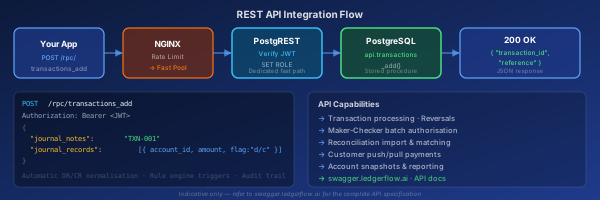
API-First — The Wallet Is Just the me_* Endpoints
There is no private "wallet protocol". Every button in the mobile app is a call to a
self-scoped api.me_* PostgREST endpoint that an integrator can drive directly under a
customer's JWT. That makes it straightforward to embed wallet movements into a partner app,
a kiosk, or an automated disbursement run.
Base URL: https://api.ledgerflow.ai
Authentication is the platform-standard JWT flow: authenticate once, then send
Authorization: Bearer <token> on every request. The token carries the customer's id and
email claims, which the database uses for identity and notification targeting — the caller
never supplies them as parameters.
API specification: https://swagger.ledgerflow.ai — every me_* endpoint, its
parameters, and response schema is browsable without writing code. Because the endpoints are
SECURITY DEFINER with an ownership gate, the same authorisation that protects the UI
protects the API: a customer can only ever touch their own accounts.
Move Money — Send, Request, Top-up, Settle
-- Send (P2P or B2B). Fees are applied automatically
-- from the paying account's fee profile.
POST /rpc/me_send_payment
Authorization: Bearer <token>
Content-Type: application/json

{
  "payer_account_id_p": 4567,
  "payee_account_id_p": 8901,
  "amount_p": 100.00,
  "payer_narration_p": "Lunch",
  "payee_narration_p": "Thanks",
  "transaction_reference_p": "INV-002214"
}
-- Returns: { "transaction_id": ..., "error_message": null }

-- Request a payment from another customer
POST /rpc/me_request_payment
{ "payer_user_id_p": 222, "payee_account_id_p": 4567,
  "amount_p": 40.00, "payer_narration_p": "Share",
  "payee_narration_p": "Dinner", "transaction_reference_p": "SPLIT-7781" }

-- Top up (cash-in) and Settle (cash-out)
POST /rpc/me_load_funds
{ "wallet_account_id_p": 4567, "amount_p": 250.00, "narration_p": "Top up" }

POST /rpc/me_settle_funds
{ "wallet_account_id_p": 4567, "amount_p": 90.00, "narration_p": "Settle funds" }
Pay by QR & Read the Statement
-- Payee: mint an open (QR) request — returns a token + expiry
POST /rpc/me_request_open
Authorization: Bearer <token>
Content-Type: application/json

{ "payee_account_id_p": 4567, "amount_p": 25.00,
  "transaction_reference_p": "STALL-12", "payee_narration_p": "Coffee",
  "expires_minutes_p": 60 }
-- Returns: { "token": "...", "amount": 25.00, "currency": "USD",
--            "expires_at": "...", "error_message": null }

-- Payer: fetch the request, then fulfil it from your own account
POST /rpc/me_request_fetch     { "token_p": "<uuid>" }
POST /rpc/me_request_fulfill   { "token_p": "<uuid>", "payer_account_id_p": 9012 }

-- Statement (own accounts only; ownership-gated)
POST /rpc/me_statement
{ "account_id_p": 4567, "period_p": "ThisMonth" }
-- Returns dr/cr, running balance, reference, counterparty_name, …

-- Email a proof-of-payment PDF to the counterparty of a line
POST /rpc/me_send_proof_of_payment
{ "account_id_p": 4567, "transaction_id_p": 778899 }
All me_* calls reject any account the bearer does not own (HTTP 403).