Flo — AI Financial Intelligence Assistant
Conversational AI with live access to your ledger.
Flo is LedgerFlow's built-in AI assistant — named Florence — embedded directly in the platform sidebar. She understands your financial data, answers questions in natural language, retrieves relevant context from documentation, and can call live API endpoints to look up accounts, transactions, and balances in real time.
Flo is not a generic chatbot bolted on. She is a purpose-built financial intelligence layer with multi-turn memory, Model Context Protocol (MCP) tool use, and retrieval-augmented generation — all running within the platform's existing security and permission model.
What Flo Can Do
Flo is accessible from a persistent sidebar on every page of the platform. You can ask her anything about the platform, your data, or financial concepts — and she responds with context drawn from three sources simultaneously:
1. Your conversation history — Flo remembers the last 20 messages in your session, enabling genuine multi-turn dialogue. Ask a follow-up, correct a misunderstanding, or drill deeper into an answer without re-explaining context.
2. Platform documentation (RAG) — Before responding, Flo searches the embedded documentation corpus using vector similarity. The 5 most relevant documentation chunks are injected into her context window, so her answers are grounded in how LedgerFlow actually works — not generic financial knowledge.
3. Live ledger data (MCP) — When you ask about specific accounts, balances, or transactions, Flo can call the live PostgREST API on your behalf. She uses your own JWT token, so her data access is governed by exactly the same row-level security and permission model as your own browser session. She cannot see data you cannot see.
After each response, Flo suggests 2–4 follow-up questions as quick-reply chips, making it easy to explore a topic without typing.
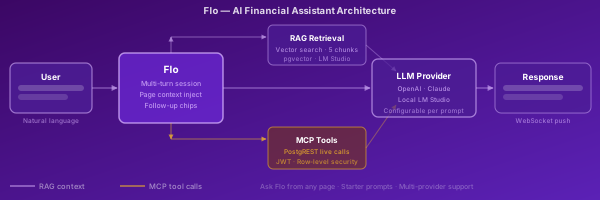
Flo Architecture — RAG + MCP + Multi-Turn Context
The diagram shows the two parallel enrichment paths Flo uses before calling the LLM:
Purple path (RAG): Your message is embedded using the same vector model as the documentation corpus. The 5 nearest documentation chunks are retrieved from pgvector and prepended to the system prompt. This path is synchronous — if the vector store is unavailable, Flo degrades gracefully to answering from training knowledge.
Gold path (MCP): In MCP mode (api.ai_mcp_chat_send), Flo's prompt includes a
set of PostgREST tool definitions. The LLM can choose to call any of these tools
mid-generation, retrieving live account balances, transaction history, or KYC status.
Tool call results are fed back into the generation loop. Your JWT is embedded in the
queue payload so every tool call respects your permissions exactly.
Responses are delivered via WebSocket push — the chat_response notification appears
in the sidebar the moment the LLM finishes, without polling.
Multi-Turn Conversation
Flo maintains a rolling window of your last 20 messages (up to 10 exchanges) per
session. Sessions are identified by a UUID session key stored alongside the message
history in api.ai_chat_history.
What this means in practice:
- Ask Flo to "explain account AC-1234" — then follow up with "what was unusual about last Tuesday?" and she will correctly resolve "last Tuesday" against account AC-1234 without you repeating it
- Correct her: "no, I meant the liability account" — she updates her working context for the rest of the session
- Start a fresh session at any time; history is persisted and accessible through the Flo History page
Sessions are scoped to the authenticated user's email. No session data is shared between users.
The history page (/ai/flo_history.sql) lets you browse and resume past conversations.
RAG — Retrieval-Augmented Generation
Retrieval-Augmented Generation grounds Flo's answers in LedgerFlow's actual documentation rather than relying solely on the LLM's training data.
How it works:
- Your message is sent to a local embedding model (LM Studio, running inside the Docker stack)
- The embedding is compared against a vector index of ingested documentation chunks using
pgvectorcosine similarity - The 5 nearest chunks are retrieved and prepended to Flo's system prompt as context
- The LLM generates a response that is specifically informed by those chunks
What is indexed: Platform documentation, functional requirements, API reference material,
and any custom content ingested via the RAG ingest pipeline (cmd/rag-ingest).
Graceful degradation: If LM Studio is unavailable, ai.retrieve_ledgerflow_context()
returns an empty result set and Flo answers from general knowledge. No error is surfaced
to the user.
MCP — Model Context Protocol: Flo with Live Tool Access
MCP elevates Flo from a documentation assistant to a live financial intelligence agent.
When a chat is initiated via api.ai_mcp_chat_send(), Flo receives a tool manifest alongside
her system prompt. The tool manifest describes every PostgREST endpoint she can call — account
lookups, transaction history, balance queries, KYC status, reconciliation results, and more.
The MCP loop:
- User asks: "Is account AC-5001 over its daily transaction limit?"
- Flo decides she needs live data and calls the
accountstool withid=AC-5001 - The pgmq-http-client executes the PostgREST call using the user's embedded JWT
- The result is returned to Flo as a tool response
- Flo formulates a grounded answer: "Account AC-5001 has processed 47 transactions today against a profile limit of 50. You are 3 transactions from the daily cap."
Security model: The JWT is extracted from the active browser session (request.headers GUC)
and embedded in the queue payload. Every tool call inherits the same role, permission set, and
row-level security policies as the user's direct API calls. Flo cannot access data the user
cannot access. She cannot bypass maker-checker rules, audit logging, or any other control.
Result: Accurate, live, permission-safe answers — not hallucinated estimates.
Ask Flo from Any Page
Every list and detail page in LedgerFlow can surface an Ask Flo link adjacent to individual rows. Clicking the link opens the Flo sidebar and pre-populates the input field with the row's context — account number, transaction ID, customer name, and other relevant fields — already encoded in the prompt.
How it works technically:
The api.ask_flo_button() function returns a markdown link with an ask-flo: URI scheme
and a URL-encoded JSON payload. The sidebar JavaScript intercepts clicks matching [href^="#ask-flo"],
reads the encoded context from the link, and injects it into the chat input.
No SQL encoding is required at page-build time. The context is assembled from the live DOM at click time — meaning the same button works correctly whether Flo's sidebar is already open or opens fresh on click.
Pilot deployment: Ask Flo buttons are live on the Accounts list, Account Detail, and Customer pages.
Follow-up Suggestion Chips
After each response, Flo appends a structured follow-up line that the platform parses into quick-reply chips displayed below the response bubble:
FOLLOWUP: What is the current balance? | Show recent transactions | Explain the fraud flag
How it works:
The LLM is instructed to always end its final response with a FOLLOWUP: line containing
2–4 pipe-separated suggested questions. The api.ai_chat_receive_response() dispatcher
strips the FOLLOWUP line before storing the message in history (so it does not pollute
subsequent context turns) and returns it as a separate field to the UI.
The UI renders each suggestion as a clickable button chip. Clicking a chip sends it as the next user message — no typing required. Chips disappear once the user sends any message.
Result: The conversation naturally deepens without requiring the user to think of their next question.