Transaction Reconciliation
Template-driven, two-tier matching between partner CSVs and your ledger.
Financial institutions and PSPs receive settlement files, bank statements, and payment gateway exports every day. Reconciling these against the internal ledger is time-consuming, error-prone, and a mandatory control for accurate financial reporting.
LedgerFlow's reconciliation engine is built around reusable, configurable templates. Each template encodes how a specific partner's CSV format maps to ledger fields — column positions, data types, timezone conventions, amount tolerances, and text extraction rules. Upload a file, run matching, and get a precise breakdown of strict matches, fuzzy matches, and exceptions — with a full audit trail from import to resolution.
How It Works — Seven Tables, One Workflow
Reconciliation in LedgerFlow is built on seven tables in the recon schema, each playing a
specific role in the data journey from raw CSV to resolved exception:
| Table | Purpose |
|---|---|
recon_templates |
One record per reconciliation relationship (e.g., "ACME Bank Settlement") |
recon_partner_csv_template |
CSV structure: column mappings, tolerances, regex rules |
recon_accounts |
Ledger accounts linked to the template (all must share one currency) |
recon_imports |
Audit record per file upload: filename, date range, row and match counts |
recon_csv_records |
Every normalised CSV row, with match result and linked transaction detail |
recon_csv_records_duplicates |
Rows rejected as duplicates of a previously imported row |
recon_tasks |
Background job queue for async matching operations |
The workflow proceeds in five stages: configure a template, upload a CSV, normalise and validate the data, run the two-tier matching engine against linked ledger accounts, then review and export the results. Each stage has its own UI page and can be revisited independently — you can re-run matching after adjusting tolerances without re-uploading the CSV.
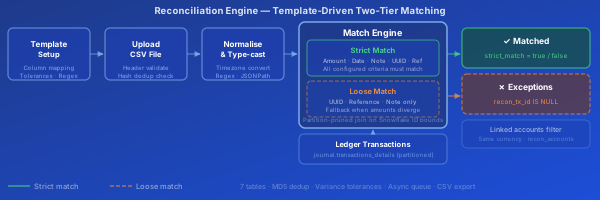
End-to-End Pipeline — Template to Results
The diagram shows the five-stage pipeline from template configuration through to matched results and exceptions.
Strict match (green) — the CSV row satisfies all configured criteria simultaneously: amount within tolerance AND date/time within variance AND all mapped identifier fields agree. This is a high-confidence, independently verifiable match.
Loose match (orange dashed) — identifier fields agree (UUID, reference, note) but amount or date diverge beyond tolerance. These are flagged for human review rather than auto-resolved. Strict matches always take precedence: a row already strict-matched is never downgraded.
Partition pruning makes matching fast at scale. Transaction timestamps are converted to Snowflake ID bounds before the join, so the database engine scans only the partitions that contain the relevant date range — even across millions of transaction rows.
Tolerances — Variance Windows for Real-World Data
Partner CSVs are rarely perfectly aligned with ledger timestamps and amounts. LedgerFlow provides two tolerance settings that widen the match window without sacrificing precision:
Timestamp variance (import_timestamp_variance, 0–120 minutes)
Settlement files frequently report times in the partner's local timezone, or include processing lag between event and report generation. The variance window extends the timestamp comparison in both directions:
abs(ledger_time - csv_time) ≤ variance_minutes
Amount variance (import_amount_variance, currency units)
Inter-bank fees, FX rounding, or platform charges can produce small systematic differences. The amount window allows a configured tolerance:
abs(ledger_amount - csv_amount) ≤ variance_amount
Timezone conversion (import_timezone) — The CSV timestamps are interpreted in the
specified timezone and converted to UTC before comparison. Supports all IANA timezone
identifiers (Africa/Johannesburg, Europe/London, America/New_York, etc.).
Text Extraction — Regex and JSONPath
Many partner CSVs embed the real matching identifier inside a larger text field. LedgerFlow supports per-field extraction rules that run before comparison:
Regex extraction — configure a capture-group regex against any text field:
map_transaction_note_regex = \bTXN-(\w+)\b
The first capture group is extracted and used as the comparison value. Tested live against the sample row in the configuration UI.
JSONPath extraction — when map_transaction_other_data contains JSON, a JSONPath
expression extracts the key to compare against tx.transaction_other_data:
map_transaction_other_json_key = $.payment.reference
Combined — regex can be applied to extract a substring from the CSV field, then JSONPath applied to the ledger's JSON payload. This handles the common case where the CSV embeds a reference in a note field and the ledger stores it inside a structured JSON blob.
All extraction results are previewed against the stored sample row before saving.
Duplicate Detection — MD5 Row Hashing
Every CSV row receives an MD5 hash (md5(row_text)::uuid) before insertion.
The recon_csv_records.md5_line_hash column has a unique constraint — attempting
to insert an identical row raises a conflict.
Behaviour on conflict: ON CONFLICT (md5_line_hash) DO NOTHING silently skips the
duplicate. The row is simultaneously inserted into recon_csv_records_duplicates with a
reference back to the original record.
What counts as a duplicate: The entire raw CSV line as a text string. A single character difference — different timestamp format, trailing space, changed amount — produces a different hash. This is intentional: it detects exact re-imports while allowing corrected re-uploads of previously rejected rows.
Import statistics: After each load, recon_imports.duplicate_count is updated with
the number of duplicates detected. Operators can download the duplicates list as a CSV
for partner reconciliation.
This mechanism prevents the most common reconciliation error: accidentally importing the same settlement file twice and generating double-counted matches.
The Two-Tier Matching Engine
Running matching is asynchronous — api.recon_match_transactions_queue(import_id) enqueues a recon_tasks record and schedules the job via pg_timetable. The UI monitors the queue via WebSocket, showing a live status indicator until the notification "Completed reconciliation matching..." arrives. For large files, this prevents browser timeouts and allows the database to apply full query optimisation.
Normalisation phase (before matching):
A temporary table temp_normalised_csv is created from the raw JSONB rows in recon_csv_records. Each row is:
- Unpacked using the column offset mappings from
recon_partner_csv_template - Type-cast to the correct PostgreSQL type per
header_row_types - Timezone-converted for timestamps using
import_timezone - Regex-extracted where
map_*_regexrules are configured - JSONPath-extracted for
other_datawheremap_transaction_other_json_keyis set
An ANALYZE is run on the temp table before the join so the query planner has accurate statistics. SET LOCAL plan_cache_mode = force_custom_plan and SET LOCAL jit = on are set for the duration of the matching query.
Partition pruning:
The normalised date range is converted to Snowflake ID bounds before the join:
id_from_partition_v = api.encode_snowflake_ts(earliest_date - 3 days - variance)
id_to_partition_v   = api.encode_snowflake_ts(latest_date + 1 day + variance)
journal.transactions_details is partitioned by Snowflake ID. Adding WHERE td.id BETWEEN id_from AND id_to causes the planner to prune every partition outside the date range — the engine reads only the relevant slices of a potentially multi-billion-row table.
Precedence rule: A strict match (strict_match = true) is never overwritten by a loose match. The UPDATE uses WHERE cm.strict_match = true OR rcr.recon_tx_id IS NULL, ensuring that re-running matching after adjusting tolerances refines loose matches to strict, never the reverse.
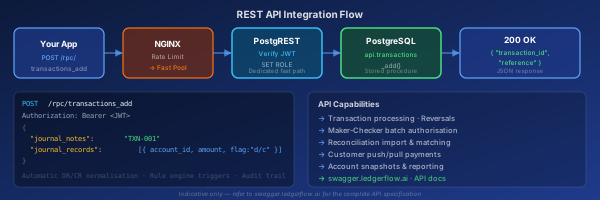
API-First Design — Every UI Action is Also an API Endpoint
The LedgerFlow web UI is built entirely on the same REST API that third-party systems use. There is no separate "API mode" — every screen in the reconciliation workflow maps directly to a PostgREST endpoint that an integration can call independently.
This means the entire reconciliation pipeline — template provisioning, CSV delivery, match triggering, and results retrieval — can be automated without human interaction. Common use cases include:
- Automated settlement ingestion — a payment gateway or bank pushes settlement files to LedgerFlow's API on a schedule, triggering import and matching without operator involvement
- ERP integration — an external system queries match results and ledger exceptions via API to drive automated journal entries or payment instructions downstream
- Audit pipeline — a compliance tool polls
recon_importsandrecon_csv_recordsto build an independent reconciliation ledger for regulatory reporting
Base URL: https://api.ledgerflow.ai
Authentication follows the same JWT flow as every other LedgerFlow endpoint — see the
Platform Architecture page for the full auth model. In brief:
authenticate once with POST /rpc/login, then include Authorization: Bearer <token> on
all subsequent requests. OIDC/SSO tokens are also accepted.
API specification: https://swagger.ledgerflow.ai — every endpoint, parameter, and
response schema is browsable without writing code. The reconciliation endpoints are listed
under the recon tag.
Template & Configuration Endpoints
-- List all configured templates
GET /recon_templates
Authorization: Bearer <token>

-- Retrieve column mapping for a template
GET /recon_partner_csv_template
  ?recon_templates_id=eq.{template_id}
Authorization: Bearer <token>

-- Update tolerance settings
PATCH /recon_partner_csv_template
  ?recon_templates_id=eq.{template_id}
Authorization: Bearer <token>
Content-Type: application/json

{
  "import_timestamp_variance": 15,
  "import_amount_variance": 0.01,
  "import_timezone": "Africa/Johannesburg"
}

-- Link a ledger account to a template
POST /recon_accounts
Authorization: Bearer <token>
Content-Type: application/json

{
  "recon_templates_id": 123,
  "account_id": 4567,
  "description": "Main settlement account"
}
See swagger.ledgerflow.ai for full filter syntax and response schemas.
Import & Matching Endpoints
-- Validate an uploaded file against a template
POST /rpc/recon_validate_against_csv_template
Authorization: Bearer <token>
Content-Type: application/json

{
  "recon_templates_id_v": 123,
  "columns_v": ["date", "reference", "amount"],
  "types_v":   ["date", "text", "numeric"],
  "samples":   [["2026-01-01", "REF-001", "100.00"]]
}

-- Returns: true (valid). Use recon_validate_against_csv_template_diff
-- for the column-level diff when the format has drifted.

-- Trigger asynchronous matching
POST /rpc/recon_match_transactions_queue
Authorization: Bearer <token>
Content-Type: application/json

{ "import_id_v": 456 }

-- Returns: { "task_id": "..." }
-- Poll recon_tasks or listen for WebSocket notification

-- Check task status
GET /recon_tasks
  ?primary_key=eq.456
  &completed=eq.false
Authorization: Bearer <token>
The async queue is the same pg_timetable-backed scheduler used across the platform.
The calling system can poll recon_tasks.completed or subscribe to the WebSocket
channel for the chat_response / task-completion notification.
Querying Match Results
-- Strict and loose matches for an import
POST /rpc/recon_matched
Authorization: Bearer <token>
Content-Type: application/json

{ "import_id_v": 456 }

-- Returns rows with:
--   strict_match (bool), transaction_detail_id,
--   account_id, amount, flag, transaction_date,
--   transaction_reference, csv_line (jsonb)

-- Ledger transactions with no CSV counterpart
POST /rpc/recon_not_matched
Authorization: Bearer <token>
Content-Type: application/json

{ "import_id_v": 456 }

-- Day-by-day reconciliation summary
GET /recon_summary
  ?import_id=eq.456
Authorization: Bearer <token>

-- Returns: date, tx_count, matched_count,
--          tx_total, matched_total per day
End-to-End Automation — Full Workflow via API
A fully automated reconciliation pipeline requires four API calls after initial template setup (which is a one-time configuration step):
1. Submit the CSV file
POST /rpc/recon_validate_against_csv_template
Validate the file matches the stored template schema. Returns an error with a JSON diff if the format has changed — the calling system can alert a human before proceeding.
2. Insert the CSV rows
Create an import header with POST /recon_imports (returns its id), then bulk-insert the
parsed rows with POST /recon_csv_records referencing that import id. Duplicate rows are
silently discarded via the MD5 constraint.
3. Trigger matching
POST /rpc/recon_match_transactions_queue
Returns a task ID. The matching engine runs asynchronously — poll recon_tasks
or listen on the WebSocket channel for completion.
4. Pull results
POST /rpc/recon_matched      ← confirmed pairs
POST /rpc/recon_not_matched  ← ledger exceptions
GET  /recon_csv_records      ← unmatched CSV rows
  ?import_id=eq.{id}&recon_tx_id=is.null
Feed results into your downstream system — ERP, audit platform, or data warehouse. Re-run steps 3–4 at any time if tolerances are adjusted.